New York Tech Media
  • News
  • FinTech
  • AI & Robotics
  • Cybersecurity
  • Startups & Leaders
  • Venture Capital
No Result
View All Result
  • News
  • FinTech
  • AI & Robotics
  • Cybersecurity
  • Startups & Leaders
  • Venture Capital
No Result
View All Result
New York Tech Media
No Result
View All Result
Home Startups & Leaders

How to disable Firefox’s Captive Portal test connection on startup

New York Tech Editorial Team by New York Tech Editorial Team
April 12, 2022
in Startups & Leaders
0
How to disable Firefox’s Captive Portal test connection on startup
Share on FacebookShare on Twitter

Mozilla’s Firefox web browser tests on startup whether the network connection that is used requires a login; this is common when a device is connected to a public hotspot, e.g., when using a hotel’s wireless connection.
firefox-network.connectivity-service.enabled

While that is useful in some cases, it is not something that many Firefox installations require. If you use Firefox at home only, you do not need the check to be performed. It reduces the automatic connections the browser makes and may speed startup just a little bit as well.

Firefox attempts to connect to http://detectportal.firefox.com/success.txt during the test to find out if it can connect to the address. The very same address is also used to test if the active network connection supports IPv6.

Note: you may need to undo the changes if you notice connectivity issues; this should not be the case, but it is easy to undo if something goes wrong.

Disable Firefox’s Network Connectivity Tests
network captive portal service enabled

  1. Load about:config in the Firefox address bar to get started.
  2. Confirm the “Accept the risk and continue” prompt that is displayed. You may also want to uncheck the “warn me when I attempt to access these preferences” to skip the prompt the next time.
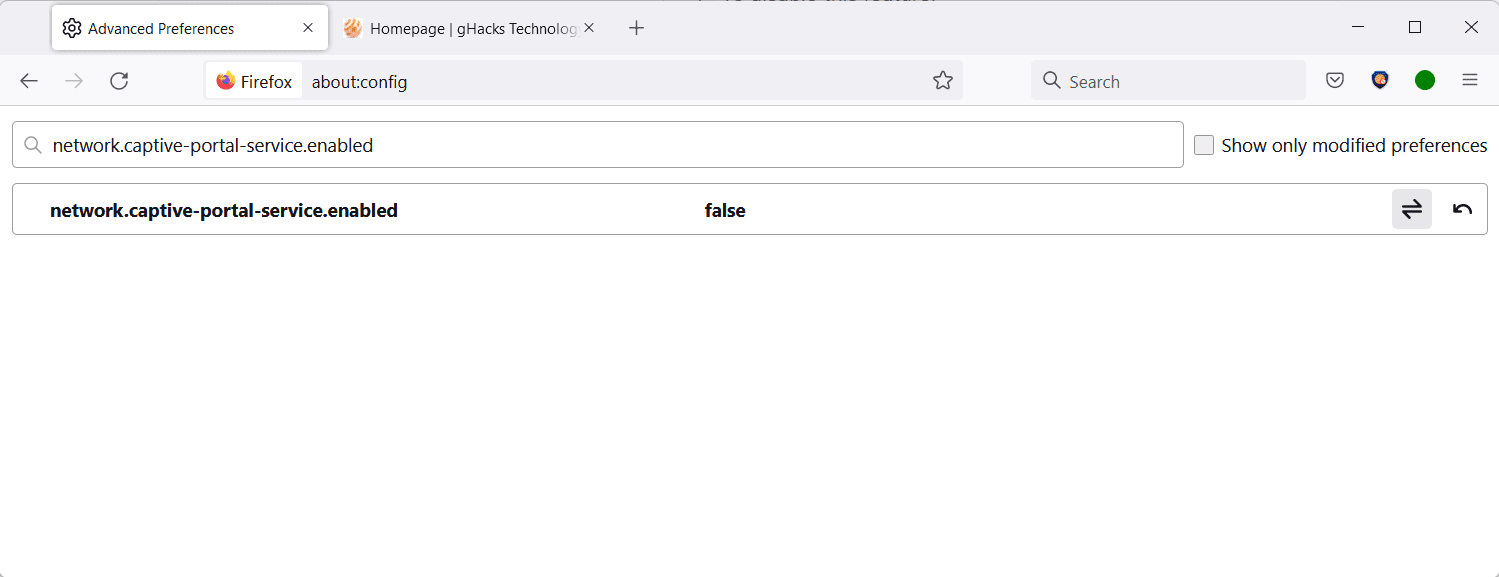
  3. Search for the preference network.captive-portal-service.enabled using the search field at the top.
  4. Set the preference to FALSE by clicking on the toggle icon located at the right. To undo the change, repeat the action so that the preference’s value is TRUE.
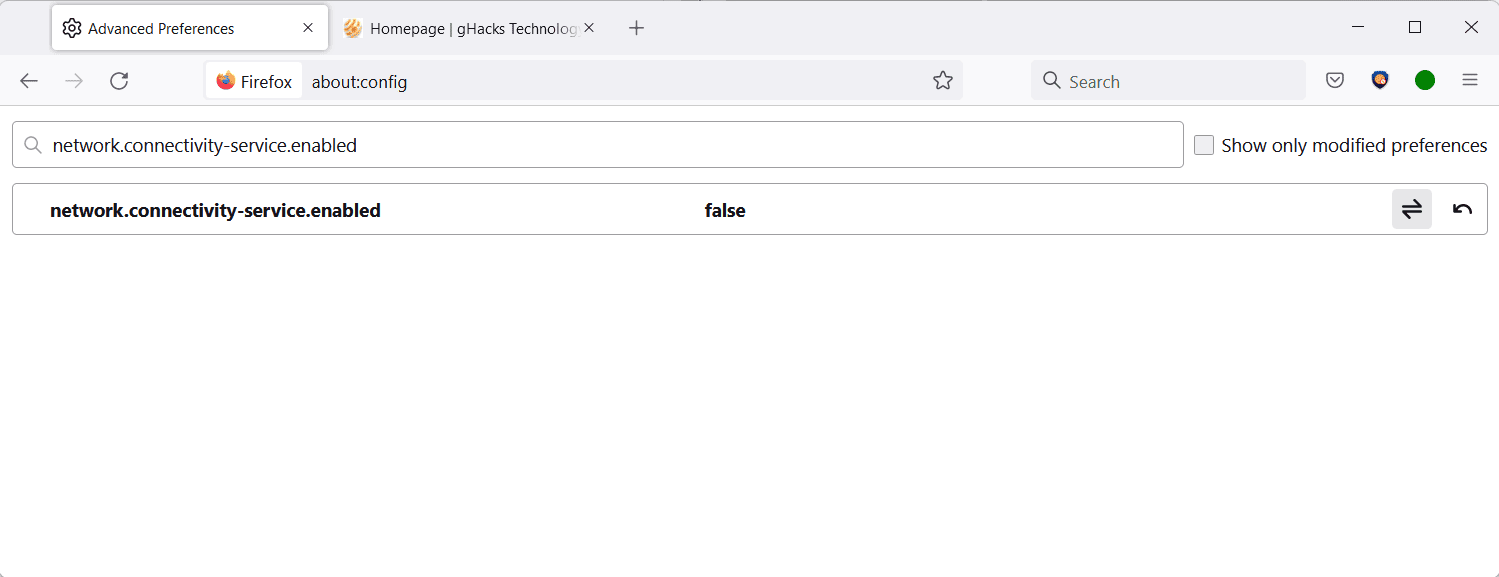
  5. Search for the preference network.connectivity-service.enabled using the same method as described above.
  6. Set the preference to FALSE by clicking on the toggle icon. To undo the change, repeat the action so that the value of the preference is set to TRUE again.

The preference network.captive-portal-service.enabled checks if the network connection requires authentication. Firefox users who travel a lot and those connecting to networks that do require authentication may want to keep the preference’s default value of TRUE. Everyone else may set it to FALSE without running into any usability or connectivity issues.

The preference network.connectivity-service.enabled determines capabilities of the network connection by connecting to the very same address as network.captive-portal-service.enabled.

The Tor project disabled the functionality in its browser, without any reported issues since the change. The development team noted that Firefox makes this connection whenever the network state changes:

NetworkConnectivityService probes http://detectportal.firefox.com/success.txt?ipv4 and http://detectportal.firefox.com/success.txt?ipv6 whenever network state changes (event network:link-status-changed). We should probably disable this unless it’s needed for browser functionality.

Closing Words

Most Firefox users do not need the two preferences when they use the browser. Some users may want to do so for privacy, others to reduce the number of connections the browser makes.

Now You: do you monitor your browser’s automatic connections?

Summary

How to disable Firefox's Captive Portal Test connection on startup

Article Name

How to disable Firefox’s Captive Portal Test connection on startup

Description

Find out how to disable Captive Portal and Network Connectivity test connections that Firefox makes automatically.

Author

Martin Brinkmann

Publisher

Ghacks Technology News

Logo

Ghacks Technology News

Advertisement

Credit: Source link

Previous Post

Lendenclub Launches Fintech Venture Fund To Support Start-ups

Next Post

AI Algorithm Improves Accuracy and Costs of Medical Image Diagnostics

New York Tech Editorial Team

New York Tech Editorial Team

New York Tech Media is a leading news publication that aims to provide the latest tech news, fintech, AI & robotics, cybersecurity, startups & leaders, venture capital, and much more!

Next Post
AI Algorithm Improves Accuracy and Costs of Medical Image Diagnostics

AI Algorithm Improves Accuracy and Costs of Medical Image Diagnostics

  • Trending
  • Comments
  • Latest
Meet the Top 10 K-Pop Artists Taking Over 2024

Meet the Top 10 K-Pop Artists Taking Over 2024

March 17, 2024
10 Raunchy Movies on Netflix You Won’t Regret Watching

10 Raunchy Movies on Netflix You Won’t Regret Watching

May 20, 2024
Panther for AWS allows security teams to monitor their AWS infrastructure in real-time

Many businesses lack a formal ransomware plan

March 29, 2022
Zach Mulcahey, 25 | Cover Story | Style Weekly

Zach Mulcahey, 25 | Cover Story | Style Weekly

March 29, 2022
How To Pitch The Investor: Ronen Menipaz, Founder of M51

How To Pitch The Investor: Ronen Menipaz, Founder of M51

March 29, 2022
Clubhouse will soon let you pin links to the top of rooms

Clubhouse will soon let you pin links to the top of rooms

October 23, 2021
Startups On Demand: renovai is the Netflix of Online Shopping

Startups On Demand: renovai is the Netflix of Online Shopping

2
Robot Company Offers $200K for Right to Use One Applicant’s Face and Voice ‘Forever’

Robot Company Offers $200K for Right to Use One Applicant’s Face and Voice ‘Forever’

1
Menashe Shani Accessibility High Tech on the low

Revolutionizing Accessibility: The Story of Purple Lens

1

Netgear announces a $1,500 Wi-Fi 6E mesh router

0
These apps let you customize Windows 11 to bring the taskbar back to life

These apps let you customize Windows 11 to bring the taskbar back to life

0
This bipedal robot uses propeller arms to slackline and skateboard

This bipedal robot uses propeller arms to slackline and skateboard

0
three men posing outdoors

An AI Company on a Tiny Island Just Beat the Biggest Names on Wall Street. Here’s the Part That Should Surprise You.

June 2, 2026
man in a blue coat wearing glasses

Why Human Skills Matter More Than Ever in the AI Era

May 27, 2026
essential travel gadgets

May 24, 2026
graphic of Next-Gen Entrepreneurs event

Leadership, Judgment, and Innovation: A Post-Event Conversation with Dr. Fang Miao

May 21, 2026
Arito founding team

Arito AI Raises $6 Million To Bring Agentic Intelligence To Finance And Revenue Teams

May 20, 2026
Viewz founding team

Viewz Raises $7M to Retire the Finance Stack as We Know It

May 19, 2026

Recommended

three men posing outdoors

An AI Company on a Tiny Island Just Beat the Biggest Names on Wall Street. Here’s the Part That Should Surprise You.

June 2, 2026
man in a blue coat wearing glasses

Why Human Skills Matter More Than Ever in the AI Era

May 27, 2026
essential travel gadgets

May 24, 2026
graphic of Next-Gen Entrepreneurs event

Leadership, Judgment, and Innovation: A Post-Event Conversation with Dr. Fang Miao

May 21, 2026

Categories

  • AI & Robotics
  • Benzinga
  • Cybersecurity
  • FinTech
  • New York Tech
  • News
  • Startups & Leaders
  • Venture Capital

Tags

AI AI QSRs Allseated Automat-it AWS B2B marketing Business CISO CISO Whisperer Collaborations Companies To Watch cryptocurrency Cybersecurity Entrepreneur Fetcherr Finance FINQ Fintech Funding Announcement hi-tech Hi Auto Impala Investing Investors investorsummit Israel israelitech Leaders LinkedIn Leaders Metaverse Mindset Minnesota omri hurwitz PointFive PR QSR Real Estate start- up startupnation Startups Startups On Demand Tech Tech leaders Unlimited Robotics VC
  • Contact Us
  • Privacy Policy
  • Terms and conditions

© 2024 All Rights Reserved - New York Tech Media

No Result
View All Result
  • News
  • FinTech
  • AI & Robotics
  • Cybersecurity
  • Startups & Leaders
  • Venture Capital

© 2024 All Rights Reserved - New York Tech Media