

New York Tech Media
  • News
  • FinTech
  • AI & Robotics
  • Cybersecurity
  • Startups & Leaders
  • Venture Capital
No Result
View All Result
  • News
  • FinTech
  • AI & Robotics
  • Cybersecurity
  • Startups & Leaders
  • Venture Capital
No Result
View All Result
New York Tech Media
No Result
View All Result
Home News

How to turn on Facebook Protect

New York Tech Editorial Team by New York Tech Editorial Team
March 7, 2022
in News
0
How to turn on Facebook Protect
Share on FacebookShare on Twitter

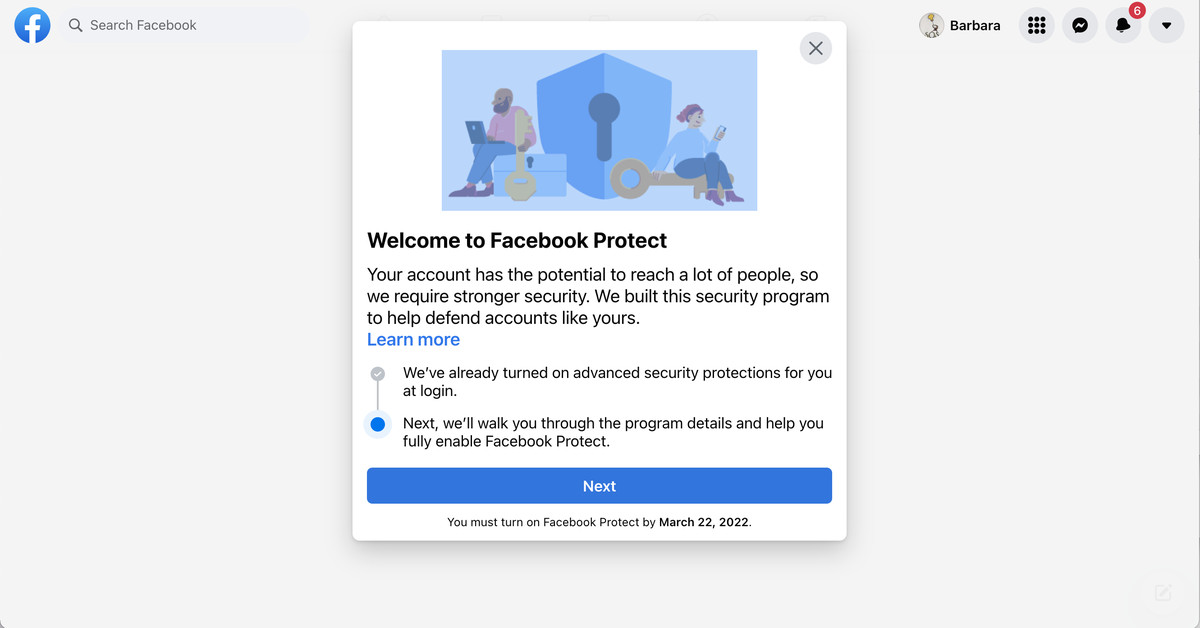
Last weekend, I was scrolling through my email, listening to the rain and wondering whether I was feeling too lazy to vacuum the rug, when I came across one with the subject line “Turn on Facebook Protect.”

“Your account requires advanced security from Facebook Protect,” it said and proceeded to tell me that if I didn’t enable Facebook Protect by a certain date, I would be locked out of my account until I enabled it. I was instructed to click on the big blue button labeled “Turn on Facebook Protect” to get started.

I was sure it was a phishing email. Until I found out it wasn’t.

It turned out that Facebook is pushing higher security for “certain people in the public eye,” and so is encouraging those on its list to adopt better security methods such as two-factor authentication. The company’s interpretation of “public eye” seems to be rather generous — for example, I, and several colleagues of my Verge colleagues who received it, don’t have particularly high Facebook followings. But this is not a bad thing, and if you happen to fall into Facebook’s interpretation of somebody who qualifies for this program and you receive an email from “security@facebookmail.com,” you can be pretty sure it’s legit.

If you do get one but don’t want to press on mysterious blue buttons, you can start the process this way:

  • Go to your Facebook page. (You may get a pop-up notice about Facebook Protect.)
  • Click on the arrow in the upper right corner (desktop) or on the three-line “hamburger” icon (mobile)
  • Select Settings & Privacy > Settings
  • Select Security and Login (desktop) or Password and Security (mobile)
  • Under Facebook Protect, you’ll see a note that “FaceBook Protect is Off.” Click on Get Started (desktop) or tap on the arrow (mobile)


After that, just follow the directions. If you have a reasonably strong password and have already enabled 2FA, then you won’t have anything else to do; you’ll simply get a message that says that you’re all set.

Incidentally, if you don’t get one of those emails and don’t see “Facebook Protect” in your Facebook security area, you can still enable 2FA in the “Security and Login” or “Password and Security” sections — it’s a good idea for everyone.

Credit: Source link

Previous Post

Rutgers Researchers Harness AI and Robotics to Treat Spinal Cord Injuries

Next Post

Meet The London Fintech That Wants To Be Investors’ One-Stop Crypto Shop

New York Tech Editorial Team

New York Tech Editorial Team

New York Tech Media is a leading news publication that aims to provide the latest tech news, fintech, AI & robotics, cybersecurity, startups & leaders, venture capital, and much more!

Next Post
Meet The London Fintech That Wants To Be Investors’ One-Stop Crypto Shop

Meet The London Fintech That Wants To Be Investors’ One-Stop Crypto Shop

  • Trending
  • Comments
  • Latest
Meet the Top 10 K-Pop Artists Taking Over 2024

Meet the Top 10 K-Pop Artists Taking Over 2024

March 17, 2024
10 Raunchy Movies on Netflix You Won’t Regret Watching

10 Raunchy Movies on Netflix You Won’t Regret Watching

May 20, 2024
Clubhouse will soon let you pin links to the top of rooms

Clubhouse will soon let you pin links to the top of rooms

October 23, 2021
Panther for AWS allows security teams to monitor their AWS infrastructure in real-time

Many businesses lack a formal ransomware plan

March 29, 2022
Zach Mulcahey, 25 | Cover Story | Style Weekly

Zach Mulcahey, 25 | Cover Story | Style Weekly

March 29, 2022
How To Pitch The Investor: Ronen Menipaz, Founder of M51

How To Pitch The Investor: Ronen Menipaz, Founder of M51

March 29, 2022
Startups On Demand: renovai is the Netflix of Online Shopping

Startups On Demand: renovai is the Netflix of Online Shopping

2
Robot Company Offers $200K for Right to Use One Applicant’s Face and Voice ‘Forever’

Robot Company Offers $200K for Right to Use One Applicant’s Face and Voice ‘Forever’

1
Menashe Shani Accessibility High Tech on the low

Revolutionizing Accessibility: The Story of Purple Lens

1

Netgear announces a $1,500 Wi-Fi 6E mesh router

0
These apps let you customize Windows 11 to bring the taskbar back to life

These apps let you customize Windows 11 to bring the taskbar back to life

0
This bipedal robot uses propeller arms to slackline and skateboard

This bipedal robot uses propeller arms to slackline and skateboard

0
How to Choose the Perfect Home Decor for Your Business

How to Choose the Perfect Home Decor for Your Business

August 17, 2026

Understanding Your Legal Options: A Guide for Employers in Provo

August 5, 2026
Bloom Security Debuts with $20 Million Seed, Reuniting the Team That Built Dig Security

Bloom Security Debuts with $20 Million Seed, Reuniting the Team That Built Dig Security

July 30, 2026
Modus team

Modus Launches with $10M to Fix Why Enterprise AI Agents Keep Failing in Production

July 29, 2026
Mate Security founders

Mate Reaches $50M in Funding Eight Months After Exiting Stealth

July 28, 2026
Way Security founders

Insight Partners and Glilot Capital Lead $20 Million Investment in Way Security

July 27, 2026

Recommended

How to Choose the Perfect Home Decor for Your Business

How to Choose the Perfect Home Decor for Your Business

August 17, 2026

Understanding Your Legal Options: A Guide for Employers in Provo

August 5, 2026
Bloom Security Debuts with $20 Million Seed, Reuniting the Team That Built Dig Security

Bloom Security Debuts with $20 Million Seed, Reuniting the Team That Built Dig Security

July 30, 2026
Modus team

Modus Launches with $10M to Fix Why Enterprise AI Agents Keep Failing in Production

July 29, 2026

Categories

  • AI & Robotics
  • Benzinga
  • Cybersecurity
  • FinTech
  • New York Tech
  • News
  • Startups & Leaders
  • Venture Capital

Tags

AI AI QSRs Allseated Automat-it AWS B2B marketing Business CISO CISO Whisperer Collaborations Companies To Watch cryptocurrency Cybersecurity Enterprise AI Entrepreneur Fetcherr Finance FINQ Fintech Funding Announcement Hi Auto Impala Investing Investors investorsummit israelitech Leaders LinkedIn Leaders Metaverse Mindset Minnesota omri hurwitz Perion PointFive PR QSR Real Estate start- up startupnation Startups Startups On Demand Tech Tech leaders Unlimited Robotics VC
  • Contact Us
  • Privacy Policy
  • Terms and conditions

© 2024 All Rights Reserved - New York Tech Media

No Result
View All Result
  • News
  • FinTech
  • AI & Robotics
  • Cybersecurity
  • Startups & Leaders
  • Venture Capital

© 2024 All Rights Reserved - New York Tech Media