New York Tech Media
  • News
  • FinTech
  • AI & Robotics
  • Cybersecurity
  • Startups & Leaders
  • Venture Capital
No Result
View All Result
  • News
  • FinTech
  • AI & Robotics
  • Cybersecurity
  • Startups & Leaders
  • Venture Capital
No Result
View All Result
New York Tech Media
No Result
View All Result
Home Startups & Leaders

Microsoft Edge Startup Boost is grayed out or turned off

New York Tech Editorial Team by New York Tech Editorial Team
February 21, 2022
in Startups & Leaders
0
Microsoft Edge Startup Boost is grayed out or turned off
Share on FacebookShare on Twitter

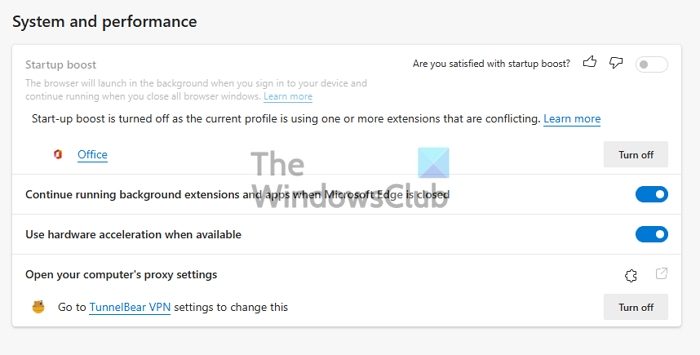
Launching a browser can sometimes be painful if it takes too much time to become useable. It is something that can happen with any browser. Keeping this in mind, Microsoft Edge comes with a Startup Boost feature to improve the load time. However, users have reported that they are not able to use this option. So if the Microsoft Edge Startup Boost is grayed out or turned off, here is how you can fix it.
Microsoft Edge Startup Boost Disabled

Why is Startup Boost not enabled by Default?

Microsoft Edge enables the boost feature for PCs with more than 4GB of RAM or more than 1GB of RAM if the device has a modern disk (modern HDD with Trim and Seek Penalty or SSD). If that is not the case, you need to enable it manually.

Microsoft Edge Startup Boost is grayed out or turned off.

This features works on similar lines as Windows, where some of the features, extensions, and items are delayed while the browser loads ahead. It makes sure it is usable. Even when you close it, the browser will keep running in the background to launch faster the next time. That said, any user will need to enable it manually, but in case of the greyed out section, follow these:

  1. Extension Warning
  2. Disable Extension Sync
  3. Create New Profile
  4. Reset Microsoft Edge

You can follow these without the need for admin permission.

1] Extension Warning

If the problem is with an extension, then it will be marked. Go to Microsoft Edge Settings > System & performance. Locate the Startup boost section, and see if there is a conflict with any extension. If yes, click the Turn off button.

If there is no warning and the screen is still greyed out, disable all the extensions. Turn them on one by one, and check if enabling any of them causes the screen to turn grey.

2] Disable Extension Sync

disable extension sync Edge Browser

If you have the data sync enabled across all devices, even the extension will be synced. Maybe you need an extension at work, but the same is not helpful for the PC at home. In that case, disable syncing of extension. Go to edge://settings/profiles/sync in the address bar, and toggle off the option for the Extensions.

When the extension keeps syncing, anyone that causes conflict will disable the Startup Boost across the devices.

3] Create New Profile

If the extension section doesn’t work, I will suggest creating a new profile or deleting the existing one and then creating a new one. It will ensure that Edge launches with everything new and no conflict.

To create a new profile, click on the profile icon on the top-right and click on Add Profile. Make sure to choose to start without data or an email account.

Once it is resolved, open Task Manager using Ctrl + Shift + Esc. Then switch to the Startup Tab and ensure Microsoft Edge is enabled. If not, even with Startup Boost, it will not work.

4] Reset Microsoft Edge

The last resort would be to reset the Microsoft Edge browser. That is likely to fix the problem for you.

Does Startup Boost impact PC resources?

Since Microsoft Edge keeps running in the background, there is a minimal impact on the computer resources. You can also choose to disable the extension to run in the background to reduce the effect further.

Microsoft Edge Startup Boost Disabled

Credit: Source link
Previous Post

NFTs Worth $1.7M Stolen from OpenSea Users

Next Post

Robotics reinspires athlete | Kids Who Make SA Great

New York Tech Editorial Team

New York Tech Editorial Team

New York Tech Media is a leading news publication that aims to provide the latest tech news, fintech, AI & robotics, cybersecurity, startups & leaders, venture capital, and much more!

Next Post
Robotics reinspires athlete | Kids Who Make SA Great

Robotics reinspires athlete | Kids Who Make SA Great

  • Trending
  • Comments
  • Latest
Meet the Top 10 K-Pop Artists Taking Over 2024

Meet the Top 10 K-Pop Artists Taking Over 2024

March 17, 2024
10 Raunchy Movies on Netflix You Won’t Regret Watching

10 Raunchy Movies on Netflix You Won’t Regret Watching

May 20, 2024
Panther for AWS allows security teams to monitor their AWS infrastructure in real-time

Many businesses lack a formal ransomware plan

March 29, 2022
Zach Mulcahey, 25 | Cover Story | Style Weekly

Zach Mulcahey, 25 | Cover Story | Style Weekly

March 29, 2022
How To Pitch The Investor: Ronen Menipaz, Founder of M51

How To Pitch The Investor: Ronen Menipaz, Founder of M51

March 29, 2022
Clubhouse will soon let you pin links to the top of rooms

Clubhouse will soon let you pin links to the top of rooms

October 23, 2021
Startups On Demand: renovai is the Netflix of Online Shopping

Startups On Demand: renovai is the Netflix of Online Shopping

2
Robot Company Offers $200K for Right to Use One Applicant’s Face and Voice ‘Forever’

Robot Company Offers $200K for Right to Use One Applicant’s Face and Voice ‘Forever’

1
Menashe Shani Accessibility High Tech on the low

Revolutionizing Accessibility: The Story of Purple Lens

1

Netgear announces a $1,500 Wi-Fi 6E mesh router

0
These apps let you customize Windows 11 to bring the taskbar back to life

These apps let you customize Windows 11 to bring the taskbar back to life

0
This bipedal robot uses propeller arms to slackline and skateboard

This bipedal robot uses propeller arms to slackline and skateboard

0
Ask Perion

Perion Launches Ask Perion to Bring AI-Powered Self-Service to Omnichannel Advertising

June 18, 2026
AI generated image courtesy of Famous Labs

Famous.ai and the Small Business Owner Who No Longer Needs Silicon Valley

June 17, 2026
Checkout customer service

Perion Selected by Best Buy Canada to Power Programmatic Retail DOOH Media Network

June 17, 2026
three men posing outdoors

An AI Company on a Tiny Island Just Beat the Biggest Names on Wall Street. Here’s the Part That Should Surprise You.

June 2, 2026
man in a blue coat wearing glasses

Why Human Skills Matter More Than Ever in the AI Era

May 27, 2026
essential travel gadgets

May 24, 2026

Recommended

Ask Perion

Perion Launches Ask Perion to Bring AI-Powered Self-Service to Omnichannel Advertising

June 18, 2026
AI generated image courtesy of Famous Labs

Famous.ai and the Small Business Owner Who No Longer Needs Silicon Valley

June 17, 2026
Checkout customer service

Perion Selected by Best Buy Canada to Power Programmatic Retail DOOH Media Network

June 17, 2026
three men posing outdoors

An AI Company on a Tiny Island Just Beat the Biggest Names on Wall Street. Here’s the Part That Should Surprise You.

June 2, 2026

Categories

  • AI & Robotics
  • Benzinga
  • Cybersecurity
  • FinTech
  • New York Tech
  • News
  • Startups & Leaders
  • Venture Capital

Tags

AI AI QSRs Allseated Automat-it AWS B2B marketing Business CISO CISO Whisperer Collaborations Companies To Watch cryptocurrency Cybersecurity Entrepreneur Fetcherr Finance FINQ Fintech Funding Announcement hi-tech Hi Auto Impala Investing Investors investorsummit israelitech Leaders LinkedIn Leaders Metaverse Mindset Minnesota omri hurwitz Perion PointFive PR QSR Real Estate start- up startupnation Startups Startups On Demand Tech Tech leaders Unlimited Robotics VC
  • Contact Us
  • Privacy Policy
  • Terms and conditions

© 2024 All Rights Reserved - New York Tech Media

No Result
View All Result
  • News
  • FinTech
  • AI & Robotics
  • Cybersecurity
  • Startups & Leaders
  • Venture Capital

© 2024 All Rights Reserved - New York Tech Media